BetterStage vs Magnet
Magnet is a paid Mac App Store utility for placing individual windows. BetterStage combines quick placement with named multi-display workspaces, automatic layout modes, and recovery.
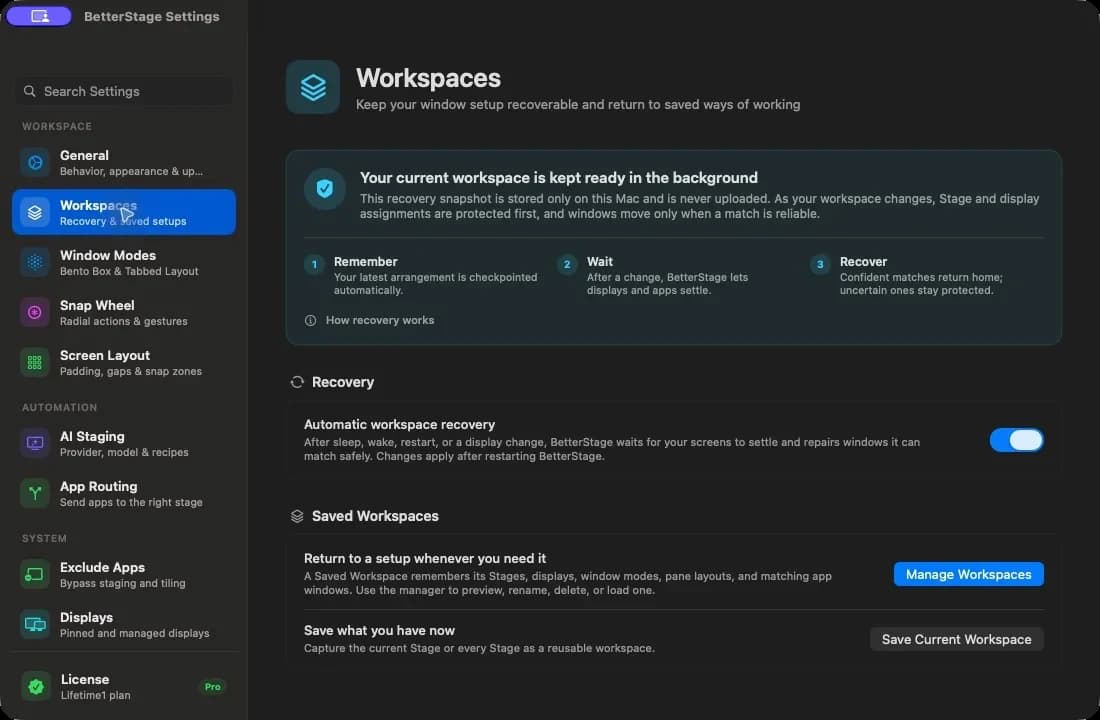
Restore the whole desk, not just a window layout.
Workspace Continuity automatically recovers stages, window positions, per-monitor Window Modes, Bento Box tiles, and Tabbed Layout panes after restart, wake, or display changes. It is included in the free tier. Pro adds named Workspaces you can save and load on demand, with missing displays preserved in the Offline Display Shelf.
Explore Workspaces & ContinuityTry BetterStage against Magnet
Download the free tier and test the faster multi-monitor workflow on your own setup.
Magnet places individual windows into halves, quarters, or thirds through screen-edge dragging and keyboard shortcuts.
But Magnet, like Rectangle, is purely a snapping tool. There are no workspaces, no auto-tiling, and no way to group windows by project or context. If you're working on three things at once, you're manually minimizing and rearranging windows every time you switch tasks.
BetterStage includes snap zones and a radial Snap Wheel, then adds 9 named project stages, Bento Box auto-tiling, Tabbed Layouts, and automatic workspace recovery.
Full feature comparison
How BetterStage compares across the entire macOS window manager landscape.
| Feature | BetterStage | Stage Mgr | Spaces | Rectangle | yabai | AeroSpace |
|---|---|---|---|---|---|---|
| Automatic workspace recovery after restart, wake & display changes | ||||||
| Save & load complete named multi-monitor workspaces | Partial | Partial | ||||
| Per-monitor Window Modes | ||||||
| Tabbed Layouts (multi-window panes) | ||||||
| AI Staging (describe your workspace in chat) | ||||||
| Managed AI, no API key (BetterStage AI) | ||||||
| Named workspaces | Partial | |||||
| Multi-monitor stages | N/A | |||||
| Workspace switching without a desktop-slide transition | N/A | |||||
| Bento Box auto-tiling | ||||||
| Snap zones | 15 zones | |||||
| Snap Wheel (radial picker) | ||||||
| No SIP disable | Core: yes | |||||
| Native GUI settings | ||||||
| Keyboard shortcuts | Fully customizable | Limited | Limited | |||
| Free tier | 3 stages | Built-in | Built-in | Free | Free | Free |
Comparison methodology
We compare the current public feature set using first-party product documentation and the shipped BetterStage app. We separate window positioning, automatic tiling, and workspace management because tools in those categories solve different problems. Prices and competitor features can change; the sources below were last verified on July 13, 2026.
Free with 3 stages. Requires macOS 14 (Sonoma) or later.
Other comparisons
vs macOS Stage Manager
Stage Manager centers the current app and keeps recent apps or groups in a side strip. BetterStage adds 9 user-named stages that switch every monitor together, direct keyboard shortcuts, tiling, and saved workspace recovery.
vs macOS Spaces
Spaces uses an animated desktop transition and numbered desktops with no project names or built-in layout memory. BetterStage switches named project stages without a desktop-slide transition and keeps each display's Window Mode with the stage.
vs Rectangle
Rectangle is a free utility for placing individual windows. BetterStage adds named project stages, automatic tiling, Tabbed Layout panes, and workspace recovery.
vs yabai
yabai is a highly configurable tiling window manager with shell-script configuration. Its core works with SIP enabled, while advanced scripting-addition features require partial SIP changes. BetterStage offers visual setup with no SIP changes.
vs Moom
Moom combines window snapping, a grid, and saved position layouts. BetterStage focuses on live project workspaces that switch throughout the day, with automatic recovery and optional tiling or tabbed panes.
vs Swish
Swish is a gesture-based window manager with elegant trackpad controls. BetterStage focuses on keyboard-first workspace management with named stages, Bento Box auto-tiling, and multi-monitor stage switching that Swish doesn't offer.
vs AeroSpace
AeroSpace is a tiling window manager inspired by i3 with tree-based layouts and CLI configuration. BetterStage provides Bento Box auto-tiling through a native GUI, plus named stages, mixed per-display modes, and workspace recovery.
vs Loop
Loop is a free radial snapping utility built around key-and-flick placement. BetterStage puts a radial Snap Wheel inside a complete workspace manager with named stages, automatic tiling, and recovery.
vs Raycast
Raycast is a launcher with built-in window-management commands. BetterStage manages complete project workspaces, while Raycast remains a complementary launcher for apps and commands.
vs Tiles
Tiles is a keyboard-driven window snapping app with edge gestures and a menu bar. BetterStage adds named project workspaces, automatic tiling, Tabbed Layouts, and recovery beyond individual-window placement.
vs Amethyst
Amethyst is a free, open-source tiling window manager with i3-style automatic layouts — but it relies on macOS Spaces for workspaces and is configured by keyboard shortcuts and a plist. BetterStage offers auto-tiling with a native GUI, its own instant workspace layer, and AI Staging.
vs BetterTouchTool
BetterTouchTool is a powerful automation and input-customization app that can also snap windows. BetterStage is a focused workspace manager — named multi-monitor stages, Bento Box auto-tiling, a Snap Wheel, and AI Staging — without the configuration overhead.
Facts verified: 2026-07-13