REDDIT
“My new must have app an all my macs! Its soo smart! Love it and never want to miss it anymore ❤️”
u/FunPoet625
View comment ↗BetterStage user

BetterStage
Give every project its own Stage — apps as tabs, perfectly tiled across every display. Switch the whole desk instantly.
“seems like it's exactly what I've been looking for”
u/yestimishere
“I’ve been using this since the beginning and love it. The developer has done a great job at fixing bugs. It’s truly unique.”
u/Latter_Pen2421
brew tap terrytz/betterstage https://github.com/terrytz/BetterStage
brew install --cask betterstageEvery monitor in a stage gets its own Window Mode — TabStack or Enhanced Native. Switch projects and the whole desk comes back arranged exactly as you left it, not a blank desktop like Spaces. Pick a stage:
Give every monitor its own Window Mode. Every stage remembers it.
Free-floating windows, with snapping and shortcuts on top. Best for screens you like to arrange by hand.
v2.0 schematic · Click a tab to switch windows within its pane.
Tiles windows into resizable panes, stacks extras as tabs, and lets you split, join, and swap without leaving the layout. Customize tab bar and pane appearance to suit your desk.
Switch a monitor's mode from the Snap Wheel or the BetterStage menu bar.
BetterStage remembers more than window positions. It protects your stages, every monitor's Window Mode, and each TabStack pane and tab group as one complete workspace.
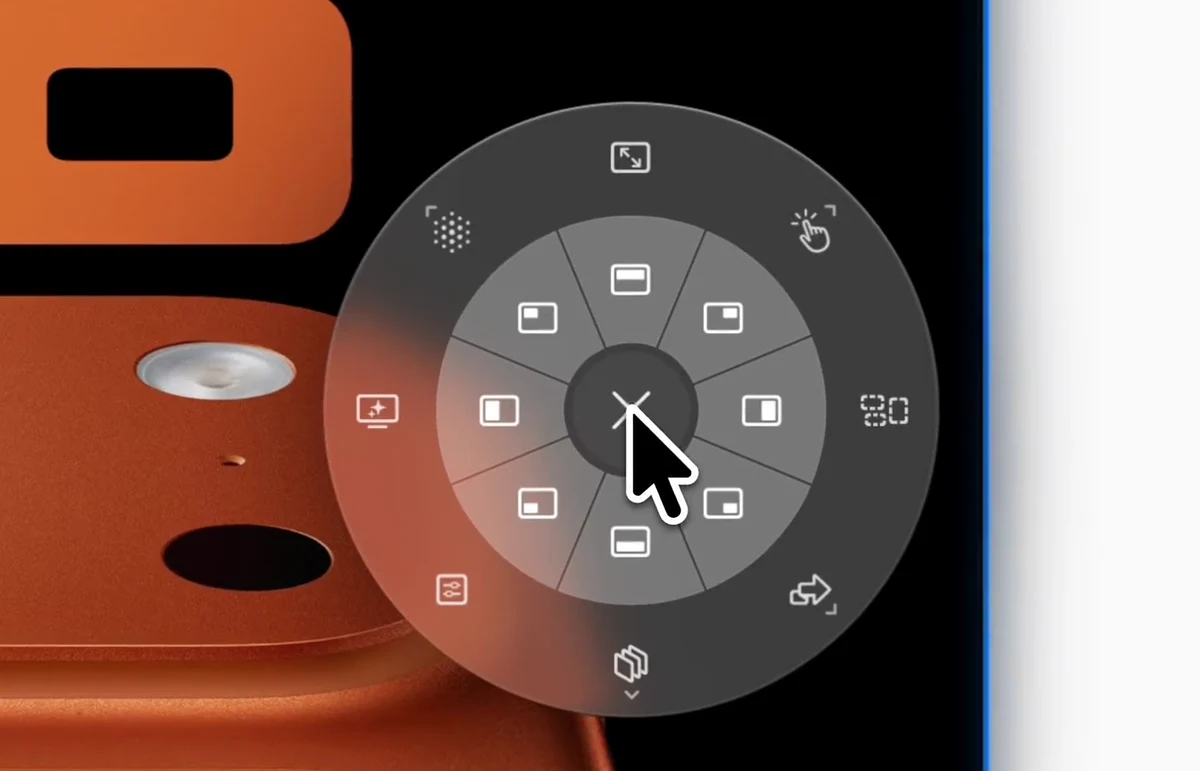
Flick the trackpad — or middle-click — and a radial menu blooms right under your cursor. Snap a window, switch a mode, jump to a stage, all without reaching for a shortcut.
Enhanced Native
Inner ring snaps the window to a half or quarter of the display. More Actions also includes Center and Window Behavior. Outer ring: Window Modes, Stages, Saved Workspaces, and custom submenus.
Prefer the keyboard? Switch stages, send windows, snap, and retile without lifting your hands. Every shortcut is rebindable — including separate mouse and trackpad controls — with ANSI and European layout presets built in.
Write a plain-English Recipe, @-mention the apps and monitors you mean, and BetterStage previews the exact plan — the best Window Mode for every screen — before a single window moves.
“Make a writing workspace with Notes, Safari, and Preview on my main display.”
Two panes. Safari and Preview share the right pane as tabs.
Approve, then arrange
BetterStage moves your windows only after you confirm the plan.
Prefer reusable instructions? Learn how to write and save AI Recipes.
The smaller touches that make BetterStage feel built for you.
Recover stages and layouts after restart, wake, or reconnecting displays.
Learn moreOne stage spans every display — switch and all screens change at once.
Learn moreChoose and reorder the logo, Stage index, window count, Stage name, and Window Modes.
Learn moreBuilt with Swift and AppKit. No Electron and no need to disable SIP.
macOS Sonoma+
Built for macOS 14 and later
100% Native
Swift & AppKit, light on resources
One Core Permission
Accessibility — no Input Monitoring or Screen Recording; visible Terminal actions may request Automation
Privacy-First
Window management runs locally. Licensing, optional AI, and website analytics are described in our privacy policy.
Read our privacy policy for licensing, optional AI, and website data handling.
BetterStage gives every project its own stage — a named workspace that snaps into place across every monitor the instant you switch.
BetterStage at a glance
What the built-in tools and tiling managers leave out.
Nine named stages instead of an unlabeled recent-app strip. No Spaces transition, no persistent screen-edge UI.
Real feedback from people who care about fast workflows, flexible layouts, and keeping a lot of windows under control.
“My new must have app an all my macs! Its soo smart! Love it and never want to miss it anymore ❤️”
BetterStage user
“As someone who developed a window manager app back in the day (Windownaut), this looks super awesome! Congrats!”
Hisham K.
Creator of Windownaut
“I’ve been using this since the beginning and love it. The developer has done a great job at fixing bugs. It’s truly unique.”
BetterStage user since launch
“This looks like the best tiling manager app I've come across so far. Great work!”
r/macapps
“I love it. I started to work on something similar but it's really hard without disabling SIP and you have to put a lot of work into it. Nice that you have keyboard navigation running as well.”
macOS developer
“Brother, that's impressive. Clearly a lot of love went into this.”
r/macapps
“seems like it's exactly what I've been looking for”
r/MacOSApps
7 days of Pro on eligible Macs. Keep Free afterward, own Pro for life, or choose the optional managed AI subscription with Pro included.
Everything you need to switch projects fast.
Download freeTry Pro for 7 days on eligible Macs. No card required.
Stages, SIP, monitors and AI — answered.
Yes. BetterStage replaces macOS Stage Manager with named workspaces (stages) that span every monitor, full keyboard shortcuts, and no forced animation or wasted screen space.
No. BetterStage works with System Integrity Protection fully enabled. Its window-management features require only Accessibility — no Input Monitoring or Screen Recording. If you choose to show a Custom Action command in Terminal, macOS may separately ask for Automation access.
It can be. Each monitor can use TabStack for automatic tiling and tabbed pane layouts, or stay free-floating in Enhanced Native — every stage remembers its own setup.
Yes. One stage spans all your displays at once, so switching a stage swaps every monitor together. You can also pin a display to keep it constant across stages.
Describe your workspace in plain English and BetterStage previews a stage plan before anything moves. Save multiple Recipes for repeat workflows, then bring your own API key, run a local model, or use managed BetterStage AI with no setup.
Yes — the free tier keeps 3 stages, Enhanced Native Mode, 16 snap zones including Center, portable Settings backups, and window snapping forever. Eligible Macs can start a 7-day Pro trial; previous trials do not reset when you download again or change accounts. Free users on eligible Macs can also try Pro for 15 minutes once every 24 hours. Pro is a one-time purchase from $19.99 — no subscription. BetterStage AI (managed, no API key) is an optional subscription from $4.99/mo.
Download free, try Pro for 7 days on eligible Macs, and give every project a desk of its own.
No credit card to try · 14-day money-back on Pro · macOS 14 (Sonoma) or later
By BetterStage · features updated for 2.0.5 on