Docs / Core Concepts
AI Staging
Describe the workspace you want in the AI Staging chat panel — @-mention specific apps, windows, stages, or monitors — and AI analyzes your open windows (titles, URLs, file paths), then proposes a stage plan you can review, refine, apply, or undo with one step (Cmd-Z in the panel). Use it with your own AI provider key on a Pro license, or with BetterStage AI— a managed subscription that needs no API key or setup.
How It Works
AI Staging scans every open window on every monitor, collects metadata (app name, window title, document path, URL), and sends it to an AI model — either your own provider (with your API key) or BetterStage's managed service if you subscribe to BetterStage AI. The model returns a plan that creates named stages and assigns each window to the right stage and monitor.
- Scan— BetterStage reads window titles, document paths, URLs, and app names for every open window.
- Analyze— The data is sent to your AI provider — your own, or BetterStage's managed service on a BetterStage AI subscription. The chat panel streams progress and keeps the proposed actions attached to the assistant response.
- Review and apply— New stages are created and each window is assigned to the right monitor on each stage. BetterStage also chooses a Window Mode for each monitor — macOS Native, Bento Box, or Tabbed Layout — to fit what's grouped there, and you can ask for a specific mode in your request. You can refine the plan before applying it, and undo the applied envelope afterward.
Triggering AI Staging
There are four ways to run AI Staging:
- Keyboard shortcut— Press the AI Staging shortcut if you have one assigned in Settings > Shortcuts.
- Menu bar— Click the BetterStage menu bar icon and select AI Staging…
- Snap Wheel — Open the Snap Wheel and choose the AI Staging slice.
- Settings — Open Settings > AI Staging to configure your provider, then run from there.
Provider Setup
With your own API key, AI Staging talks directly to your provider and no data passes through BetterStage servers. (With a BetterStage AIsubscription, requests are routed through BetterStage's managed service instead — no key needed.) Configure your provider in Settings > AI Staging. BetterStage ships with 25 provider presets: OpenAI, Claude (Anthropic), Google Gemini, OpenRouter, Groq, Together AI, Mistral, xAI (Grok), DeepSeek, Moonshot (Kimi), Zhipu (GLM), Alibaba Qwen, MiniMax, Tencent Hunyuan, ByteDance Doubao, NVIDIA NIM, Hugging Face, Azure OpenAI, and more — including local servers like Ollama and LM Studio.
- Live model lists— pick a preset and BetterStage fetches the models your key can actually use.
- Region picker— providers with regional endpoints (Qwen, Moonshot, Zhipu, MiniMax, SiliconFlow) let you switch between domestic and international base URLs.
- Per-provider API keys— each provider remembers its own key, so switching presets never loses a key.
- Custom endpoint— the Custom (OpenAI-compatible) preset accepts any base URL and model name, e.g. a proxy or self-hosted server.
| Provider | Default Model | Auth |
|---|---|---|
| OpenAI | gpt-4.1-mini | API key (Bearer token) |
| Claude (Anthropic) | claude-sonnet-4-6 | API key (x-api-key header) |
| Ollama (local) | your installed model | None (localhost) |
| Custom (OpenAI-compatible) | any | API key (Bearer token) |
The other 22 presets follow the same OpenAI-compatible pattern with their base URL and default model pre-filled.
Test Connection
Settings > AI Staging includes a Test Connection button that sends a real chat message to your configured model — so you know the endpoint, key, and model all actually work before you depend on them. Setup problems are caught before the request with a clear message and an Open Settings button instead of a raw provider error.
Saved Recipes
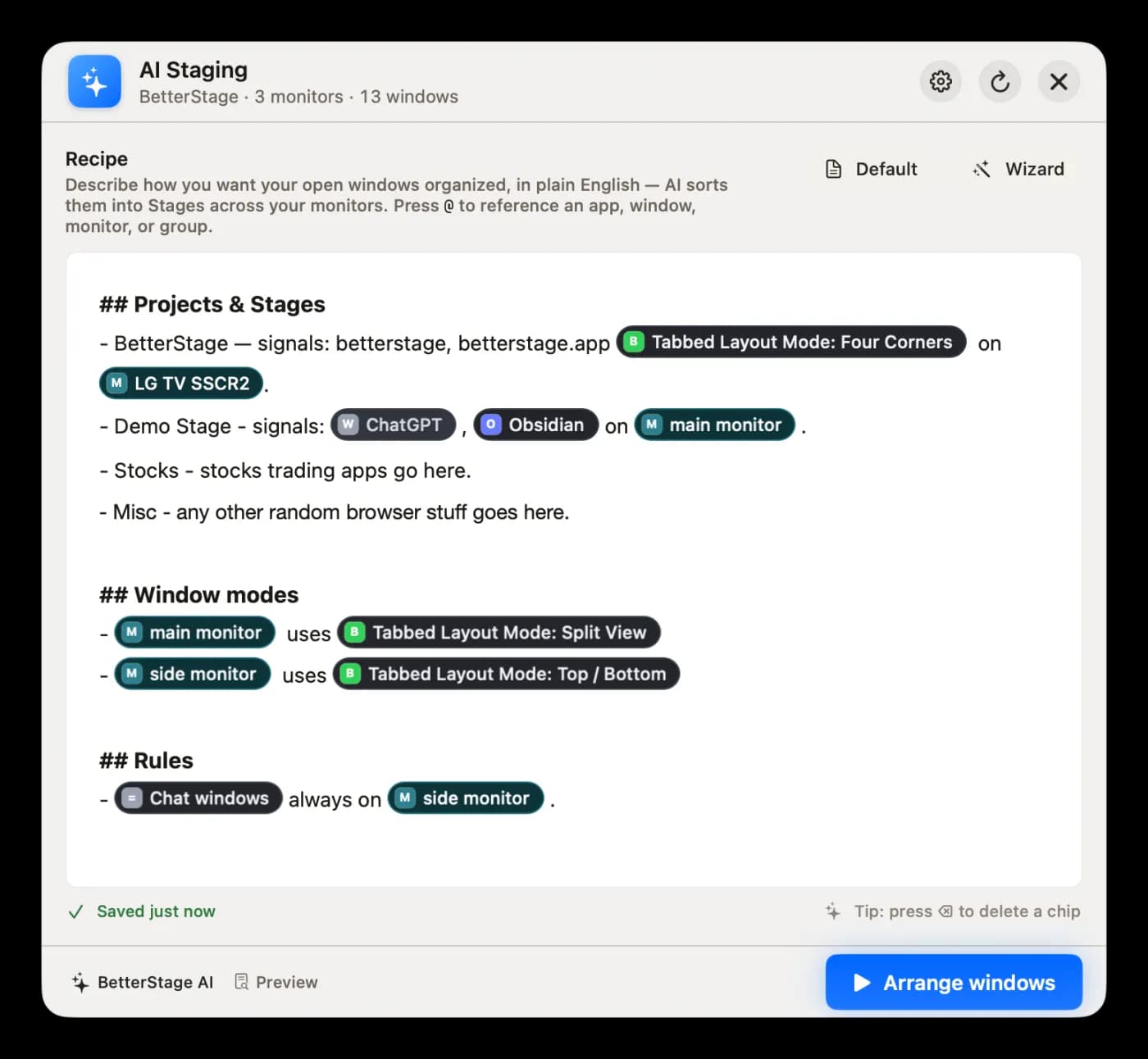
Recipes are saved instructions for how your workspace should be arranged. Keep separate Recipes for different workflows — coding, design review, support, writing, or anything else you repeat. The AI Staging panel lets you switch Recipes, create a new one, duplicate or rename an existing one, delete old ones, and choose a default Recipe for new sessions.
The selected Recipe is included when you run AI Staging. Edit it with the same @-mention chips as the live chat (monitors, stages, windows, apps, and Window Modes), preview the exact prompt sent to the model, and run an arrangement straight from the panel.
Example Recipe notes:
- “Put chat apps and music on the small side monitor. Keep browser tabs with project docs next to the editor.”
- “Always create a Comms stage for Slack, Discord, and email.”
- “Group by client name when possible.”
What Data Is Sent
AI Staging sends a workspace snapshot to the AI model. With your own API key it goes directly to your provider and BetterStage servers never see it; with a BetterStage AI subscription it is routed through BetterStage's managed service. The snapshot includes:
- Window metadata— app name, window title, document file path, content URL (host + path)
- Monitor layout— display names, arrangement order, frame bounds, primary/secondary status
- System constraints— max stage count, max windows per stage
No file contents, screenshots, or keystrokes are sent. Window titles, file paths, and URLs can still contain sensitive project or document names, so choose a provider you trust.
Requirements
- Pro license— AI Staging is a Pro feature.
- An AI provider— either your own API key for one of the 25 supported providers (or any OpenAI-compatible endpoint), or a BetterStage AI subscription, which runs the AI for you with no key.
- Internet connection— Required for cloud providers. Local servers (Ollama, LM Studio) work offline.