Window Modes
Tabbed Layout Mode
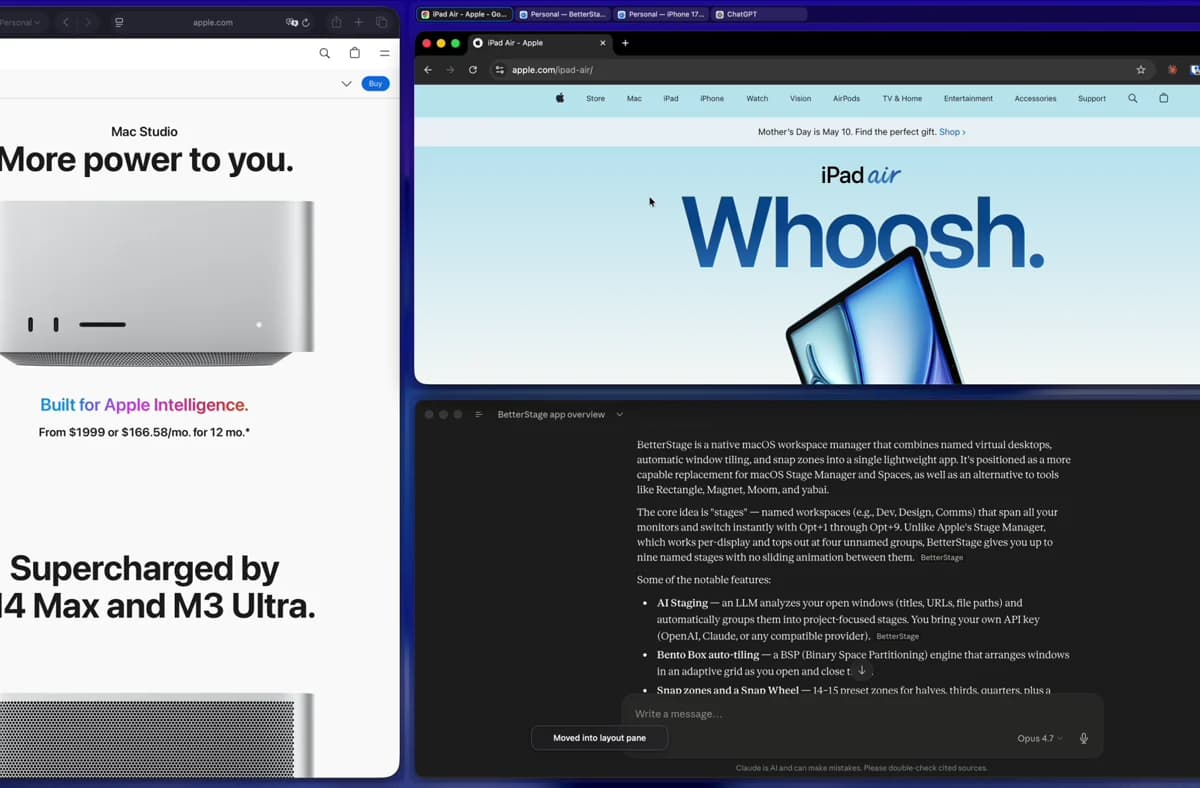
Tabbed Layout Mode is the third Window Mode. You design a layout once — the panes the monitor should be split into — and then drop or launch apps into those panes. Multiple windows in the same pane stack as tabs you click between, like browser tabs but for any app.
How it works
1. Set a monitor to Tabbed Layout Mode
Use the Snap Wheel → Window Modes submenu, or the BetterStage menu bar. Pick a built-in preset (Split View, Top / Bottom, Focus + Stack, Four Corners, One Full Screen) or one of your own from the layout editor. See Layout Presets for managing presets.
2. Drop windows into panes
Drag any window into a pane to assign it, click the pane's launch button, or right-click the pane and choose Launch App Here. Search your installed apps and BetterStage opens a new app window there when the app supports it, or moves a suitable existing window into the pane. Multiple windows in the same pane stack as tabs. The pane's tab strip shows every window assigned to it — click a tab to bring that window to the front. Snap zones, the Snap Wheel, and directional shortcuts move a window into the adjacent pane instead of snapping to halves or quarters.
3. Empty panes stay reserved
Panes you haven't filled yet stay visible as drop targets. They keep their position and size so the layout doesn't collapse before you drop a window in or launch an app into the pane.
Pane actions and app launching
Each pane has its own quick actions. Click the pane's + button or right-click inside the pane and choose Launch App Here. Search your installed apps, pick one, and BetterStage opens a new window in that pane when the app supports it. If the app is already running, BetterStage asks it for a new window and falls back to moving a suitable existing app window into the pane when needed.
Activating a layout
When you switch a monitor into Tabbed Layout Mode, BetterStage restores every window assigned to the layout into its pane. On large layouts this happens asynchronously so the UI stays responsive — a brief restore indicator appears while windows settle into place.
Switching a monitor away from Tabbed Layout Mode releases its windows back to free-floating, but keeps the layout itself saved so you can come back to it later.
Moving windows with tab drags
Drag a tab onto another pane to move that window between panes. The source pane keeps its remaining tabs; the destination pane gains the tab you dropped.
Tab drags reach beyond the layout, too. Drop a tab onto a Bento Box or macOS Native monitor to move the window there, or drag it up to the Stages Bar to send that window to another stage.
Working with tabs
- Hover a tab to see the full window title and app name in a tooltip, which helps when long titles are cut off.
- Click a tab's X button to close that window directly, just like closing a browser tab.
- When you close the selected tab, BetterStage focuses the tab to its right, or the tab to its left if it was the last one.
- Closing a non-selected tab removes it from the tab bar immediately; you do not need to wait for a later window scan.
- Right-click a tab to quit its app. Hold Option while opening the menu to show Relaunch App instead; BetterStage waits for a normal quit and respects unsaved-work prompts.
- Right-click pane chrome for pane actions such as Launch App Here, Zoom Pane, Restore Panes, splitting the pane, or removing it from a multi-pane layout.
- Choose the selected tab's color in Settings > Window Modes: keep BetterStage's neutral glass, or tint it with your macOS accent color.
Zooming a pane
Need one pane full-size for a moment? Zoom Pane expands the focused pane to fill the whole monitor and tucks the others away. It's fully reversible — Restore Panes brings the layout right back, every window in the pane it came from.
Zoom a pane three ways: from the pane's actions menu, from the Snap Wheel's adaptive Full slice (it reads Zoom Pane in this mode), or with the Maximize shortcut (default Ctrl+Opt+Return). While a pane is zoomed, that slice and the menu both flip to Restore Panes, and a one-time hint shows you how to bring the panes back.
Switching between tabs in the same zoomed pane keeps the pane zoomed. Selecting a tab in another pane restores the full layout first, and inactive tabs return to their normal pane frames instead of staying zoom-sized behind the active window.
Editing a layout
Open Settings > Window Modes to edit panes: drag handles to resize, drop on a pane edge to split it into a new pane, or click a pane to select it and remove it. Live previews appear as you drag, including empty panes, so every affected pane shows its new size. Divider resizing follows the Ghost Frame Previewsetting under Window Modes > Resize Interaction: glass previews when it is on, live window updates when it is off. Each pane's windows are shown as tab chips.
Customizing appearance
You can tune the look of every tabbed layout to match your setup. Open Settings > Window Modes and adjust these controls:
- Tabbed Container Padding— the space between each pane's glass container and the app window inside it.
- Pane Opacity— the translucency behind each pane's content area. App windows and tab labels stay fully readable.
- Tab Bar Padding— the left and right inset around each tab bar. Raise it for a roomier bar; lower it for a tighter, denser look.
- Tab Bar Background— how translucent the tab bar background appears without fading tab titles, buttons, or app windows.
- Tab Width Style— Chrome keeps tabs compact and equal-width, while Safari stretches the last tab to fill extra bar space.
- Active tab color— keep BetterStage's neutral glass, or tint the selected tab with your macOS accent color.
A Reset button on the controls returns these values to their defaults in one click, so you can experiment freely.
Apps with native tabs
Apps that use macOS native tabs — like Terminal.app, Ghostty, and others — work properly in Tabbed Layout Mode. Their native tabs stay inside their assigned pane: no phantom duplicate tabs, no tabs jumping between panes during stage switches, and your tab state is preserved when you switch stages and come back.
If you notice a native-tab app misbehaving in a pane, try switching away from the stage and back — BetterStage consolidates the app's tabs into the correct pane when you switch back. For apps that still resist, you can add them to Settings > Exclude Apps > Float in Window Modes so they float above the layout.
Apps that should float
Add small dialogs, color pickers, and browser session-restore prompts to Settings > Exclude Apps > Float in Window Modes so they float above your tabbed layout instead of being assigned to a pane.
Next
Layout Presets