Tutorials / Everyday Workflows
Manage Windows Entirely from the Keyboard
If you live on the keyboard, reaching for the mouse to arrange windows is friction. BetterStage exposes every core action as a configurable shortcut. This tutorial covers the shortcuts worth committing to muscle memory and how to remap them to your layout.
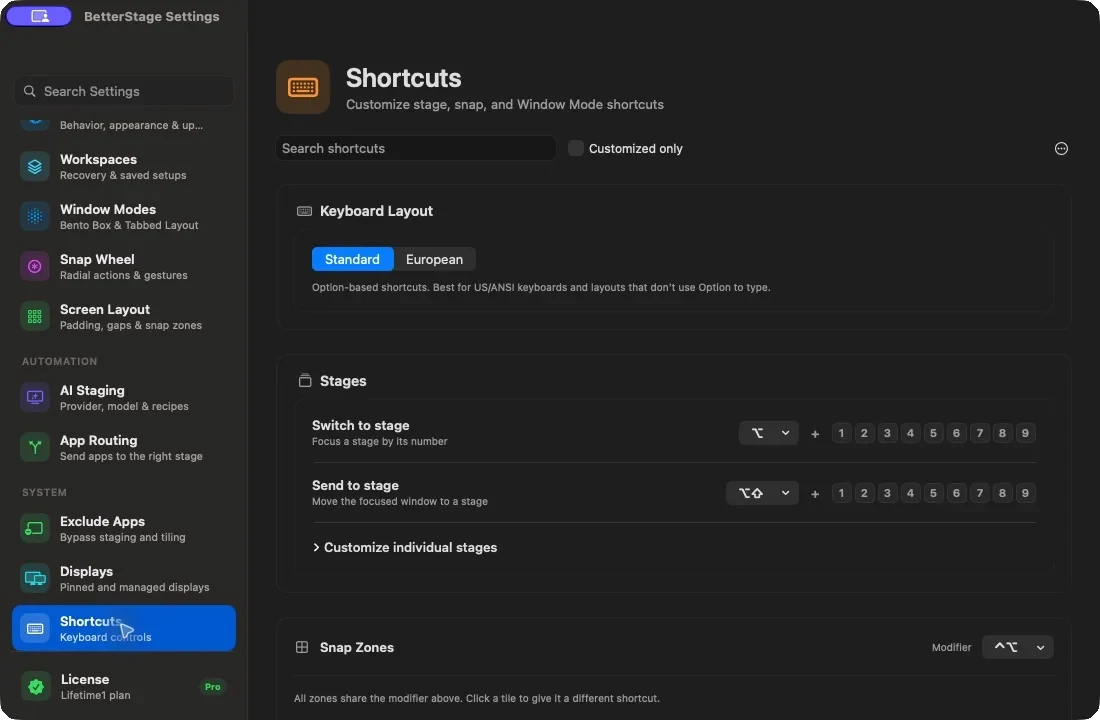
Step by step
- 1
Learn the stage-switching keys
Opt+1 through Opt+9 jump to a stage by number. Opt+Tab and Opt+Shift+Tab cycle forward and backward. Opt+N creates a new stage. These four are enough to navigate your whole workspace without the mouse.
- 2
Send the focused window to another stage
Opt+Shift plus a number moves the active window to that stage — Opt+Shift+3 sends it to stage 3. Turn on "follow window" (Switch on Send) in settings if you want to jump to the destination stage at the same time.
- 3
Snap windows to zones with shortcuts
Every snap zone — halves, thirds, quarters, maximize, center — has a keyboard binding. Snap the focused window left or right, into a quarter, or full-screen without dragging. Open Settings > Shortcuts to see and rebind the full list.
- 4
Retile and cycle within a stage
In Bento Box mode, Opt+Down retiles the current monitor into a clean grid. Turn on stage-scoped Cmd+` to cycle only the windows on the active stage instead of every window of an app system-wide.
- 5
Pick the shortcut preset for your keyboard
BetterStage ships two presets. ANSI uses Opt-based chords; European adds Control to the bindings that would otherwise type characters on Opt-heavy layouts. The onboarding picker auto-detects your layout, and you can switch presets or rebind any single shortcut in Settings > Shortcuts.
Tips
- The Ctrl+Opt chord opens the Snap Wheel from the keyboard — a radial menu you can drive with the arrow keys for snapping and stage actions.
- Only Opt+Tab / Opt+Shift+Tab are fixed. Every other shortcut, including the stage number rows, is fully remappable.
Frequently asked questions
Can I change the modifier from Option to something else?
Yes. Every shortcut except Opt+Tab and Opt+Shift+Tab is configurable in Settings > Shortcuts. You can rebind individual actions or switch between the ANSI and European presets.
Do the shortcuts need Input Monitoring permission?
No. Keyboard shortcuts use the native macOS Carbon hotkey API, so BetterStage only needs the Accessibility permission, not Input Monitoring.
Will the shortcuts conflict with my apps?
BetterStage's defaults avoid common app shortcuts, and the settings show conflicts when you assign a key. If a binding clashes with an app, remap it in seconds.
Try it yourself
BetterStage is free for up to three stages with full snap zones, and includes a 10-day trial of every Pro feature — AI Staging, Bento Box auto-tiling, Tabbed Layouts, and Pinned Displays.
Download BetterStageRelated tutorials
Replace macOS Spaces with Stages
Move from unnamed, slow-animating Spaces to named stages that switch instantly.
Build an Auto-Tiling Coding Layout with Bento Box
Turn a monitor into an auto-tiling grid — every new window snaps into place.
Save and Reuse Window Layouts with Presets
Lock a monitor into reusable pane layouts with tabs — Split View, Focus + Stack, and more.